After flashing ROMs or installing updates, it is possible that the phone will get an invalid IMEI or unknown baseband. Invalid IMEI would mean no mobile network connections.
This tutorial will help you restore / fix lost / missing IMEI and Serial Numbers for MT6582, MT6572, MT6592, MT6589, MT6595
One method of restoring/repairing an invalid IMEI or unknown baseband is outlined in
this tutorial. If this method does not work, you may try using MTK Droid Tools to manually enter IMEI numbers.
If these methods fail, check to see if you have a valid Serial Number.
1. From your phone keypad, type in *#66#.
2. Tap on SN. If it shows a blank space, that means you would first have to restore your Serial Number before you can work on fixing the IMEI.
NOTE: This method assumes your Serial Number is also invalid or null. However, if you have a valid Serial Number and only need to restore IMEI, you can still use this guide. Just choose method B below and do the IMEI Download option.Requirements:
Connect to Maui META
1. Extract and install Maui META Software. Do not launch the program yet.
2. Switch your phone on and connect it to your PC. Install MediaTek VCOM Drivers.
3. Disconnect your phone and turn it off.
4. Keeping Device Manager open and visible in the background, locate MauiMETA Program and Run as Administrator.
5. Click on Options in the menu bar, and select “Connect Smart phone into META mode”
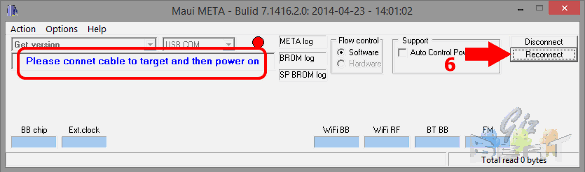
6. Click on Reconnect. Maui META will now ask you to “Please connect cable to target and then power on”.

7. Connect your phone to the PC, but DO NOT turn it on. Maui META will trigger the power up sequence. You should hear about 2 connect-disconnect sequence sounds from your PC.
a. During the first connection to Maui META, your phone will boot partially while CDC VCOM Drivers are installed automatically. Wait for it to finish.
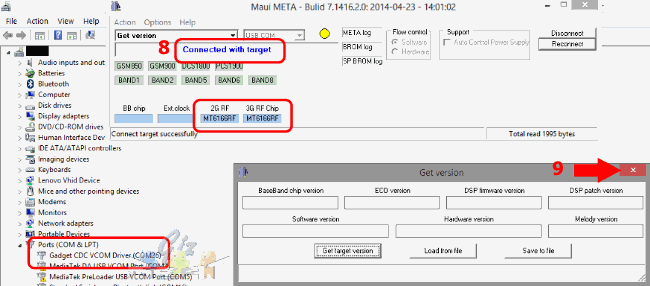
b. After successful installation, you should see “Gadget CDC VCOM Driver (COMxx)” in Device Manager.
c. Even if the installation was successful, Maui META may still be unable to connect to your phone. If this is the case, close Maui META and disconnect your phone. Shut your phone off manually.
d. Run Maui META as administrator again and repeat step 5 to 7 and proceed to step 8.
8. Check if the connection was successful.
It is successful if you see the following:
- Your phone will appear in Device Manager as a Gadget CDC VCOM Driver (COMxx)
- Maui META indicates “Connected with Target” and shows your RF chip versions
- Your phone shows a static boot logo

If the connection was successful, proceed to step 9. However, f your phone shows as a MediaTek Preloader in Device Manager, or if your phone starts charging via USB, follow the steps below.
a. Go to Device Manager, highlight your phone in the list and right-click on it. Choose to update drivers manually, then point to this folder: (D:\…\MTK_USB_ADB_Ultimate\All MTK USB Driver 2014 Properties)
b. Disconnect your phone, and repeat steps 5 to 8.
c. If you are continuously returning to these sub-steps, try using a different USB port.
(note: If your phone is not showing in Device Manager at all, uninstall drivers. Download
USBdeview software, Run as Administrator, then uninstall your phone’s Device IDs. Restart at step 2.)
9. Once your phone boots into META mode, a Get Version pop up window will appear. Ignore and close this window.
Restoring Values
From here, there are two possible methods to go through. If the Update Parameter does not work (i.e. no successful flash message), do method B.
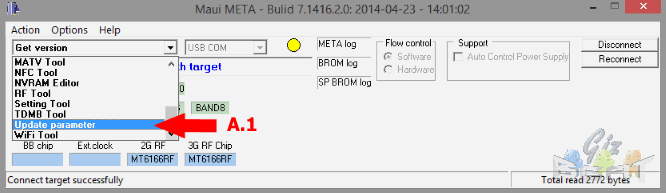
A. Update ParameterA.1. In the main Maui META window, click on the drop down menu and select Update Parameter.
A.2. At the bottom of the pop up window, tick Barcode.
A.3. Click on “Change NVRAM Database” and select the NVRAM Database file that is suitable for your current ROM. Click Open.
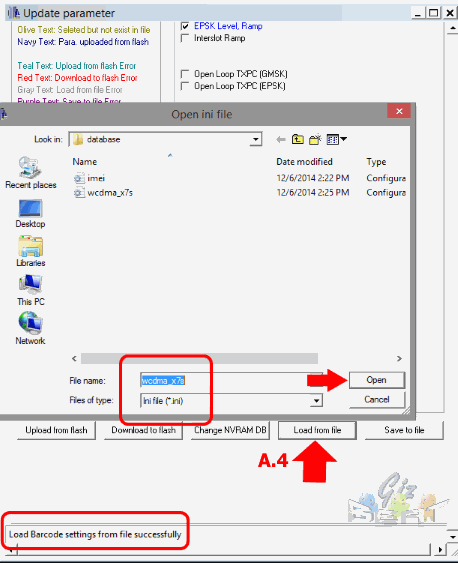
A.4. Click on “Load from File” and select the .ini file that is compatible with your phone.
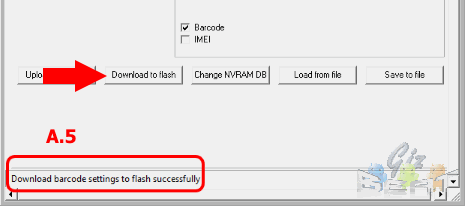
A.5. Click on Download to Flash and wait for this message: “Download Barcode Settings to flash successfully”.
B. Barcode Download + IMEI DownloadB.1. Barcode Download
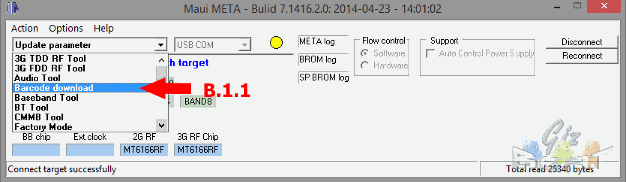
B.1.1. In the main Maui META window, click on the drop down menu and select Barcode Download.
B.1.2. Click on “Change NVRAM Database” and select the NVRAM Database file that is suitable for your current ROM. Click Open.
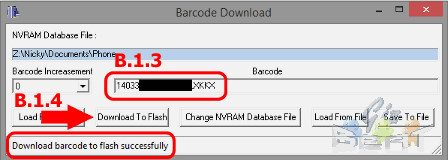
B.1.3. Type in the Serial Number you obtained from the back of the phone.
(If you are restoring a backup, click on “Load from File” and select the appropriate .ini file.)
B.1.4. Click on “Download to Flash”. Check the bottom of the window to see if the flash was successful.
B.1.5. Close the Barcode Download window.
B.2 IMEI Download
B.2.1. In the main Maui META window, click on the drop down menu and select IMEI Download.
B.2.2 Click on “Change NVRAM Database” and select the NVRAM Database file that is compatible with your current ROM version. Click Open.
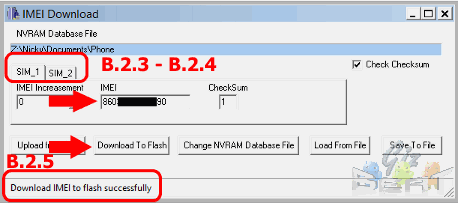
B.2.3. In the SIM1 tab, type in the IMEI for SIM1. (Note: the last number of the IMEI goes into the checksum box.)
B.2.4. Click on SIM2 tab, and enter the IMEI for SIM2.
(If you are restoring a backup, select “Load From File” and select the appropriate .ini file. You only need to load this once for both IMEI numbers.)
B.2.5. Click on “Download to Flash”. Check the bottom of the window to see if the flash was successful.
Exiting META Mode
1. Close all pop-up windows.
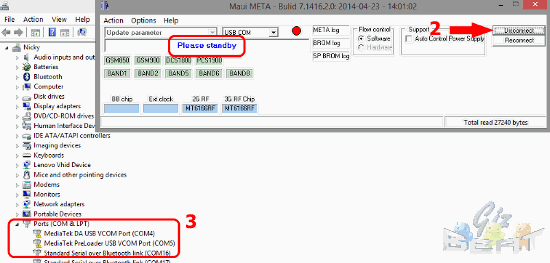
2. Click on Disconnect, you should see a message saying “Please Standby”
3. Wait for Gadget CDC VCOM Driver to disappear from Device Manager List.
4. Wait for your phone to shutdown and enter charging mode.
5. Close Maui META and disconnect your phone.
if you now have a valid Serial Number and IMEI Numbers.