Wednesday, July 30, 2014

Microsoft airs Cortana vs. Siri ad showing contextually-aware tasks

Microsoft on Monday shared a new television commercial which the company first showed off at its annual conference back in April to rally up developers who were concerned that the software giant was losing its mojo.
The 30-second video depicts a showdown between Cortana, Microsoft’s own digital personal assistant baked into Windows Phone 8.1, and Apple’s Siri.
Microsoft’s assistant is shown completing a number of contextually-aware tasks using a plethora of services and data sources…
From the video’s YouTube description:
Say hello to Cortana, your new personal assistant. Cortana will remind you to leave early to beat traffic and help you get to your destination on time, will remind you that you need milk when passing the grocery store, and will remind you to say happy birthday when your mom calls. Available now on the new Nokia Lumia 635 and on other Lumia phones.
Check it out below.

The Windows maker is allegedly considering porting Cortana to iOS and Android.
According to Microsoft executives, Cortana has been conceived as a “pervasive” feature so not only is the company mulling bringing her over to iOS and Android, but to the desktop and into vehicles and other venues, too.
The Redmond giant is no stranger to anti-Apple advertising.
A series of advertisements for its Surface tablets routinely take aim at the iPad’s sub-par specs, lack of true multitasking and other features Microsoft’s marketing department decides to paint in negative light.
The company even attempted to lure would-be switchers by giving $650 in trade in value to customers willing to exchange their MacBook Air for a Surface Pro 3 tablet.
Is the Cortana ad funny, do you think?

Telltale confirms third season of ‘The Walking Dead’


Folks worried that the final episode of The Walking Dead: Season Two will be the end of the series can rest easy. Developer Telltale Games has confirmed this weekend that the story of the dead will live on in season 3.
The studio made the announcement yesterday at Comic-Con, during a panel hosted by Skybound Entertainment. It publishes The Walking Dead comics, of which both the game and the popular television show are based…
Here’s the tweet from Telltale:

Telltale’s The Walking Dead doesn’t share characters or story lines with its TV counterpart, but it does feature an award-winning script and intuitive gameplay. You play as a main character, and determine your own fate.
The game is split into seasons, broken down into 5 episodes. We are currently in season 2, which follows the story of Clementine, a young girl orphaned by the undead apocalypse. Episode 4 was just released last week.
There’s no word on when season 3 is coming, but we imagine it’ll be sometime in early 2015. Coincidentally, AMC just announced it’s working on its own Walking Dead game, which is also expected to land early next year.
Telltale’s The Walking Dead: Season Two is available on PCs, consoles and can be foundin the App Store for $4.99. Each episode can be purchased via IAP for $4.99, or you can buy a multipack (episodes 2-5) for $14.99.

Wallpapers of the week: Colorado landscapes

During the last two months, the Wallpapers of the Week section was populated with contrived or graphically designed wallpapers. While walls like the “Complex Geometry” andPuerta del Sol Apple Store opening were very well received, today we celebrate natural beauty of the Colorado landscape.
A skill I always envy is an artist’s ability to capture nature through a camera lens. Much more complicated than pointing and shooting your Photo app on a smartphone, true beauty is difficult to capture. An artist I keep up with published these images recently and shared them through Twitter. Get downloading!

Wallpapers

Today’s wallpaper entries are courtesy of Solefield Photography. Lauren’s images are always excellent snapshots of the great outdoors, or sometimes her favorite pups. To keep up, catch her on Twitter @Solefield or browse her additional work on Deviant Art. The iOS device wallpaper images were captured in Keystone, Colorado.
Download: Left; Right
For those commenters each week who complain about never getting a desktop wallpaper, we have an option for you today. While the Wallpapers of the Week section is specifically designed to share images for iOS devices, we do aim to please. In an effort to make some people happy, below is another fantastic image by Solefield. The treetop canopy was captured in Golden, CO.
Download: Dancing

The best dating apps for iPhone


Dating is a very important social event that practically every human being experiences, or at least hopes to experience, at least once in his or her lifetime. It is also incredibly difficult to meet people after the age of 18 when your social circles are blown away with your graduation caps. Those in their early 20s can still survive the dating game, but it doesn’t take long for our social options to dwindle.
Luckily, in the age of technology, it is easier than it was a decade ago to find that special someone. Whether you are looking for your life partner, want to send sweet nothings to your current love interest, or just want to hook up, we’ve got a list of what we think are the best dating apps for iPhone…

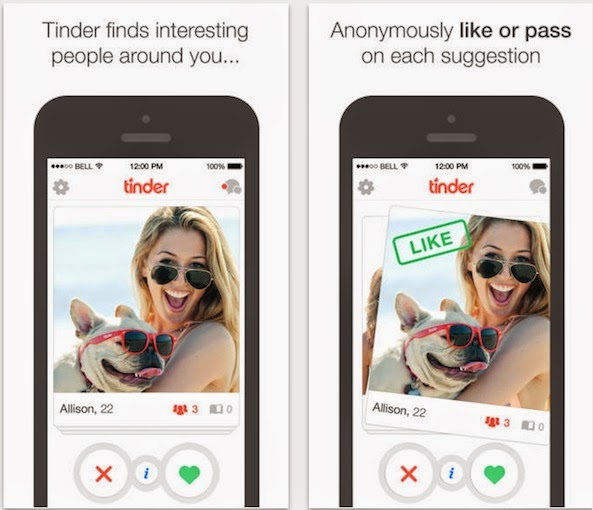
Tinder

Tinder may be the most popular dating service in the App Store right now. It took off like wildfire shortly after it launched and now boasts millions of users across the world. Users find dating matches by location instead of interests. It started out as a great way to meet up for a quick romp in the sheets, but has quickly gained a reputation for being a way to connect with people in real life that you may already know through friends via Facebook. It’s still a great way to hook up, but it can also lead to long lasting relationships. This app is available for free.

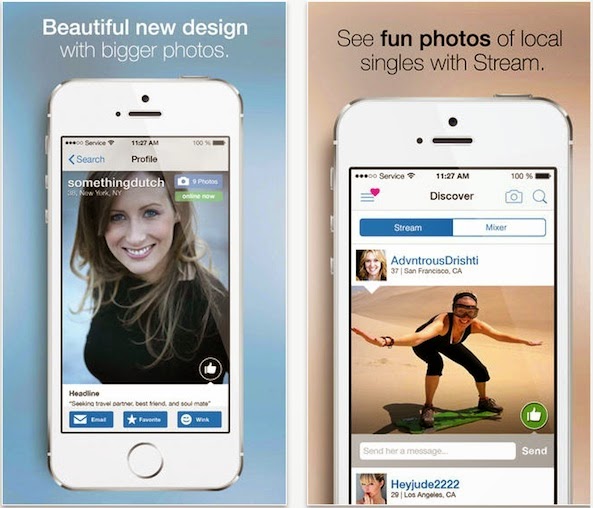
Match.com

This dating service is huge, probably the largest in the country. You will almost definitely find someone for you with the many millions of users on match.com. This site builds possible connections by matching you with others who have similar interests. Once you find someone that fits the bill, you can send a “wink” to begin a correspondence. You can chat with potential dates, look at photos of matches, and even find people nearby that you might want to meet. This app is available for free.

HowAboutWe Dating

Sometimes, you just want to do something specific and wish you knew someone else who wanted to do the same. With this app, you can find that person by posting a date idea. Maybe you want a companion to see the latest rom-com. Maybe you’ve always wanted to try ice-skating and want a friendly tutor to show you how. Post your idea, “How about we…” and see who else is interested. This app is available for free.

eHarmony

For those who are looking for a serious relationship that will potentially lead to marriage, this is the service for you. My mom met her second husband using this service and she has been married for 10 years now. Similar to Match.com, users are connected to others based on compatible interests. Finding your soul mate could be as easy as entering a list of your favorite movies. Once you’ve filled out an in-depth questionnaire, the wedding bells will be ringing. This app is available for free.

OkCupid

From my personal experience, OKCupid was the first dating service that made dating services cool. I have many 20-something and 30-something friends who have successfully found all manner of dating companions from this service. After building your profile, send your face and personality out into the world and see who likes you. If you see someone with a cool profile, like them back. After that, it’s up to you how far you take things. You can chat in-app, filter match options, and see what people think of you without getting caught. This app is available for free.

Let’s Date: Fun & Easy Social Dating

This iOS dating service takes a page or two from Tinder by allowing users to approve or remove potential dates with just a swipe. It also requires that you have a Facebook account with at least 50 friends for a year. So, it is quite a bit harder to make up your online persona just to be a jerk on a date. Once two people approve of each other anonymously, Let’s Date will notify both parties involved and even suggest a safe place to meet for the upcoming rendezvous. This app is available for free.

Coffee Meets Bagel

I can’t count the number of times my single friends have asked me if I have any other single friends that they would be interested in. When on the spot, I can never think of anyone. This app makes it possible for my single friends to dig through my contacts in order to meet up. That is, users log in through Facebook and the app lists friends of friends that also use the service. If your old high school buddy is an acquaintance of a pretty single woman he forgot he knew, you’ll be able to ask her on a date and your mutual friend can be the conversation starter. This app is available for free.

Pure

This is one of those dating services that seem to be dedicated to the great hook-up. In today’s world, a one-night stand is more common than it used to be and services like Pure help facilitate that kind of meeting. If you want to meet up with someone in your area, post your request. The request will be visible to other users for one hour. If someone in the area likes where you are headed, you will be connected via chat and be able to arrange the location with no fuss or muss. This app is available for free.

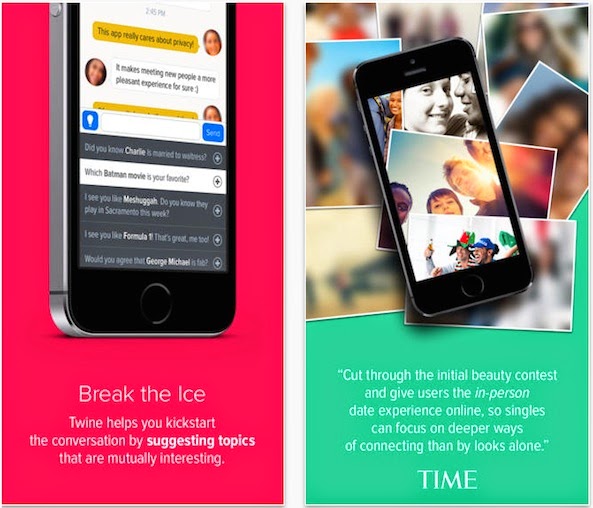
Twine

Most dating services allow you to remain anonymous until you find someone you are interested in. This service allows you to remain anonymous while you are getting to know someone and you are the one who chooses whether to reveal your identity to your suitor. The app also makes conversation starting easier with the “ICE Breaker” feature, which suggests topics that it recognizes as a common interest between two parties. This app is available for free.

Smart Search spices up Spotlight search on iOS 7


Spotlight can be used to search for content (music, app, mail etc.) on your iPhone, iPad or iPod and it can be accessed by swiping down the Home screen. Personally, I’ve never found Spotlight search useful and I rarely use it except when I’m tempted to. However, iOS 8 takes the feature to a whole new level by allowing users to search for an iTunes song, App Store app, website, Wikipedia entry and much more directly from Spotlight.
Inspired by iOS 8 Spotlight search, Smart Search is a new jailbreak tweak that improves the functionality of Spotlight search on jailbroken iOS 7 devices by expanding its search capability. It gives users the ability to search for a keyword from the App Store, iTunes Store, Google, Wikipedia, YouTube and more. We decided to give Smart Search a try and it worked flawlessly as advertised.

Once you install the tweak, swipe down the Home screen to open Spotlight. You’ll notice a revamped Spotlight search with a number of new app icons above the search field. Tap on an app icon and enter your keyword or phrase to search it from that particular app. For instance, if you tap on the App Store icon and type in a keyword, it will display a list of results derived from the App Store. Likewise, you can search from the following sources:
  • App Store
  • iTunes Store
  • Google
  • Spotify
  • TMDb
  • Wikipedia
  • YouTube
When you tap on a search result, the corresponding app will launch if you already have it, otherwise it will launch Safari. For example, if you tap on a search result from Spotify, it will open the Spotify app if you already have it, or else, it will launch Safari. Smart Search also includes an iPhone icon that allows you to search for content on your device.
Once you’ve installed the tweak, you’ll find a new preferences panel in the Settings app for Smart Search. There, you can choose which search sources or plugin you want to enable as well as rearrange the icons in Spotlight by making use of the drag handles.
Smart Search is an impressive Spotlight extension and displays the search results accurately and quickly. If you’re keen to enjoy iOS 8′s Spotlight search or a similar concept on your jailbroken iOS 7 device, you might want to give Smart Search a try. The developer also notes that more search sources will be available in the future.

The tweak is available in Cydia’s BigBoss repository for $2.49 and is compatible with iOS 7 devices.

Tweetbot 3 quietly rolls out animated GIF support via iOS media player


You’re probably aware that Twitter began supporting animated GIFs via its web interface in mid-June. If so, you may also recall that Twitter’s iOS client has picked up support for this popular file format a mere week later.
The feature isn’t exclusive to the company’s own mobile apps: Twitter soon after updated its API to let makers of third-party clients implement direct GIF sharing via pic.twitter.com links.
Tapbots’ Tweetbot, one of the best Twitter clients for the Mac and iOS devices, does not officially recognize animated GIFs. That’s why tapping a pic.twitter.com GIF link in Tweetbot for iPhone opens the detail view for the tweet itself rather than play the embedded animation inline.
This has been driving me nuts – but not anymore. As it turns out, Tapbots yesterday issued a maintenance update to Tweetbot for the iPhone and iPod touch which apparently adds support for animated GIFs via Twitter’s pic.twitter.com links. Strangely enough, the official release notes make no mention of this nice little addition whatsoever…
As first noticed by Aldrin Calimlim of AppAdvice, updating your Tweetbot 3 copy to version 3.4.1 makes animated GIFs play within the app.
I can confirm that this is true.
With the previous Tweetbot 3.4 installed on my iPhone, I tapped the animated GIF embedded in this example tweet, to no avail. As can be seen on the screenshots top of post, Tweetbot simply took me to the tweet detail view.
Once I updated to the latest Tweetbot 3.4.1, animated GIFs started showing thumbnails inline with a play icon, indicating the media could be played within the app, as shown below. Tap it and Tweetbot reproduces the embedded animated GIF, though still not inline.

Instead, the software passes the link to the iOS media player provided as a card hovering above your timeline. There’s a full screen button that can be tapped to enjoy the animation without any UI distractions. You can also pause the playback and access other standard iOS media player controls as you normally would.

That’s how Tweetbot now handles animated GIFs in both the latest version of iOS 7 and the iOS 8 Beta 4. It’s different to how Tweetbot handles pic.twitter.com links for regular images or App Store links, both of which render inline.
If I had to take a wild guess here, I’d say Tapbots has decided to use iOS’s built-in media player as a stop-gap solution of sorts as they’re working on implementing animated GIFs inline. Regardless, this is great news because previously, you had to paste a tweet link into your web browser to see the GIF animated inside Twitter’s web app.
For those wondering, Tweetbot for Mac still won’t do animated GIFs, nor would Tweetbot for iPad [$2.99 download].
The only viable explanation must be that Tapbots has either forgotten to mention this feature in its release notes or the company intentionally isn’t making any fuss about it, perhaps to quietly test the feature with its customers.
At any rate, release notes accompanying the download mention three minor improvements : a fix for iOS 8 beta issues, another fix dealing with Flickr image previews and various other bug fixes.
Tweetbot for the iPhone and iPod touch is $4.99 in the App Store.
The native app requires iOS 7.0 or later.
If you want the extend your Tweetbot experience to the Mac, the OS X client will run you $19.99.

Claimed circuit board hints at NFC-enabled iPhone 6 - again!

Combing through our archive of posts mentioning “iPhone” and “NFC” is all it takes to realize that talk of Apple allegedly adopting NFC is intensifying, not dying down. In fact, rumors calling for NFC-enabled iPhones date as far back as 2011!
Thus far, however, the iconic smartphone has not picked up support for NFC technology, which is an acronym for Near Field Communication. On the other hand, Apple has numerous NFC-related patents.
Additionally, it doesn’t really hurt to mention that a growing number of high-end Android handsets include NFC as part of their standard feature set. Well, today a claimed image has surfaced apparently picturing an iPhone 6 printed circuit board with what appears to be an embedded NFC chip…
Shared by the French blog Nowhereelse.fr [Google translate] which obtained them from one of its Chinese sources, a series of photographs show the purported logic board said to belong to a 4.7-inch iPhone 6 model.
In addition to the expected  components such as three times faster 802.11ac Wi-Fi, there seems to be an NFC chip in there. The publication’s well-informed source has stated that the iPhone 6, internally referred to as N61, has unspecified NFC capabilities.
Despite the obvious similarities between the supposed iPhone 6 logic board and the iPhone 5s motherboard, the former’s layout appears slightly redesigned with screw holes matching up perfectly with those spotted in recent leaks of iPhone 6 rear shell parts.
MacRumors editor Eric Slivka took it upon himself to visualize just how this circuit board compares to the existing iPhone 5s part. In addition to a much longer part extending across what would be the top of a 4.7-inch iPhone 6 model, the components pictured on the images indicate the part could be genuine (though it’s hard to tell for sure).
Slivka explains:
With the photos showing only the bare printed board and no chips or other components installed, it is difficult to tell much new information from the part, although the locations of some components can be identified based on their similarities to other iPhone logic boards.
NFC is commonly used for contactless transactions and data exchange.
Android, for instance, uses NFC to pair devices securely before establishing an ad-hoc Wi-Fi Direct session between them. This is called Android Beam and select Samsung devices come with the company’ own implementation, dubbed S-Beam, which only works across Galaxy devices.
It’s fairly safe to speculate that Apple doesn’t need NFC for wireless file sharing – AirDrop gets the job done over Wi-Fi and Bluetooth. Mobile payments? It’s been suggested before that Apple’s own mobile payment solution would pass on NFC due to security concerns – marketing boss Phil Schiller famously said that it wasn’t clear that NFC is the solution to any current problem.
Apple’s many patents may offer some additional clues in the form of NFC-powered digital media gifting between iOS devices, wireless data exchange over NFC, proximity-based data transfers, the connected home (see below) and, yes, the mythical iWallet.
Another possibility: as NFC exchanges are possible between an idle NFC device and an unpowered NFC chip (often called a “tag”), maybe Apple is looking to enhance iBeacons with NFC support?
Let’s also mention that AuthenTec, a smart sensor maker Apple bought to build Touch ID, used to build NFC chips for clients.
With so many conflicting rumors pertaining to NFC-enabled iPhones having been swirling for years now, you’re advised not to get ahead of yourself predicting what this claimed circuit board leak may or may not indicate in terms of rumored iPhone 6 features.
Coincidentally or not, VentureBeat (not the most reliable of sources) earlier this week said that the iPhone 6 packs in an NFC chip, wireless charging, a better 4G antenna and “a much bigger screen”, among several other highly-anticipated features.
One thing’s for sure: Fall can’t come soon enough.

Get paid to share your links!